Leave Your Message

7 Tips for Finding Good Office Chairs for Gaming?

Choosing Good Office Chairs For Gaming requires more than bright colors, deep cushions, or a dramatic racing design. A chair must support long work sessions, focused play, and frequent posture changes. The wrong model may feel comfortable for ten minutes, then create pressure behind your knees or heat across your back.

The World Health Organization reports that musculoskeletal conditions affect approximately 1.71 billion people worldwide. That figure does not prove every gaming chair causes discomfort. It does show why daily seating deserves careful attention. OSHA’s computer workstation guidance also emphasizes adjustable seat height, lumbar support, stable armrests, and proper foot contact. These details matter more than marketing language.

Real testing reveals uncomfortable truths. A soft cushion can feel luxurious initially. It may flatten quickly. Fixed armrests can look sturdy, yet force your shoulders upward. A tall backrest may suit one person and restrict another. I have found that small adjustments often matter more than premium branding, although personal testing is not perfectly scientific.

Industry standards offer a useful checkpoint. ANSI/BIFMA seating standards evaluate durability, stability, and structural performance through controlled tests. They do not guarantee perfect comfort for every body shape. Gensler’s 2024 Global Workplace Survey also highlights the growing importance of choice and flexibility in work environments. That principle applies to gaming chairs, too.

This guide examines seven practical selection tips. It considers measurements, materials, adjustability, ergonomics, durability, and realistic value. No chair is universally perfect. The best choice fits your body, desk, schedule, and willingness to adjust it properly.
7 Tips for Finding Good Office Chairs for Gaming?

What Makes an Office Chair Suitable for Gaming?

What Makes an Office Chair Suitable for Gaming?

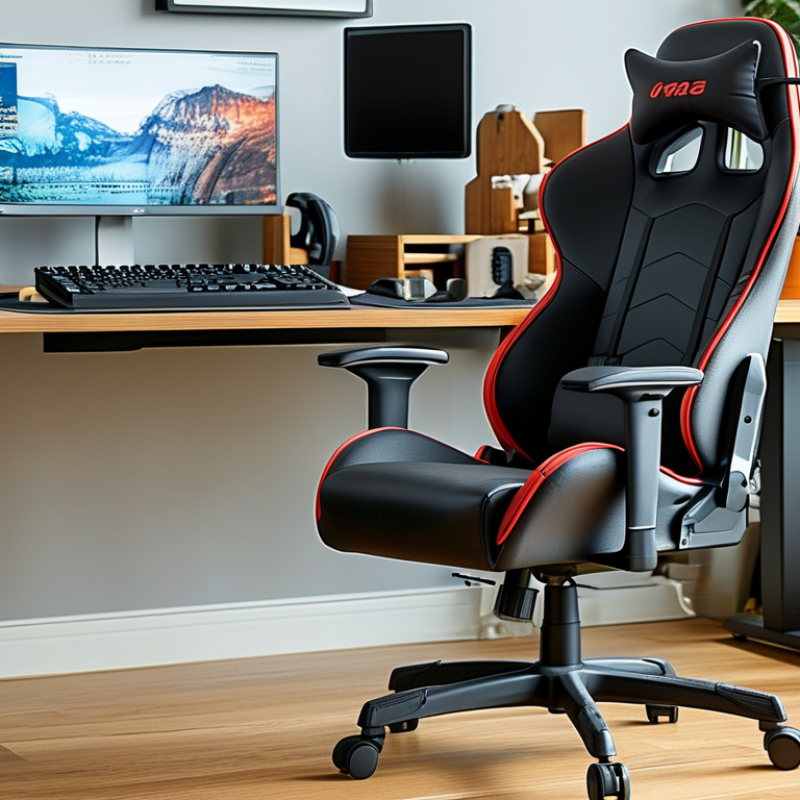
A gaming-friendly office chair should support long sitting without forcing your body into one position. Look for adjustable seat height, armrests, backrest tilt, and lumbar support. Your feet should rest flat, with knees close to a right angle. The screen should stay near eye level. Small adjustments matter.

Tip: Check the seat depth. When sitting fully back, leave two or three fingers between the seat edge and your knees. A seat that is too deep can press behind your legs. A firm, breathable surface also helps during warm gaming sessions. Soft padding feels comfortable at first, but it may flatten quickly.

Tip: Test movement, not just appearance. Recline slightly during story games, then sit upright during competitive matches. The chair should remain stable when you shift your weight. Adjustable armrests can reduce shoulder tension, especially when using a mouse for several hours. I once chose a chair with excellent padding but weak armrests. My shoulders noticed before I did.

Tip: Measure your desk and body before buying. Check the chair’s height range, seat width, and weight capacity. These details are more reliable than dramatic product photos. If possible, sit in the chair for at least fifteen minutes. My own judgment has been wrong after only two minutes. A suitable office chair should feel supportive, not restrictive, while leaving room for regular breaks and posture changes.
How to Assess Ergonomics, Adjustability, and Posture Support

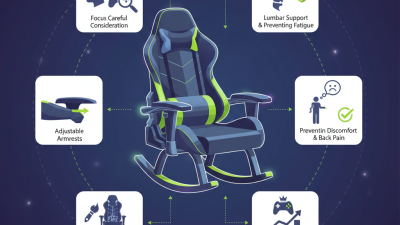
Finding a good office chair for gaming starts with posture, not racing-style appearance. Sit with feet flat, knees near 90 degrees, and hips slightly higher than your knees. The backrest should support your lower back without forcing it forward. I test this by sitting for twenty minutes, then checking whether my shoulders remain relaxed.

Comfort at first contact can mislead. A soft cushion may feel pleasant, yet compress unevenly during a long session. Look for firm, breathable padding that supports your weight without pressing behind the knees.

Adjustability matters because desks and bodies differ. Set the seat height so your elbows rest near desk level while your shoulders stay down. Seat depth should leave two or three fingers between the cushion edge and your knees. Test it carefully.

Tilt tension should let the backrest move smoothly, not snap backward. Use a recline range during breaks, but keep a stable angle for aiming or typing. Armrests should move upward, inward, outward, and preferably backward. Misaligned armrests can lift your shoulders for hours. That happened to me.

Check lumbar support while wearing your usual headset and clothing. Some chairs fit well in a showroom but fail after an hour. Ask whether controls are reachable without twisting. Test the chair on hard flooring and carpet if possible.

Small details matter. Change position every thirty to forty minutes, stretch briefly, and notice numbness early. No chair fixes poor habits alone. My assessment is imperfect; I sometimes choose appearance over support. Writing down discomfort after each session makes that mistake harder to repeat.

Which Materials, Dimensions, and Features Affect Daily Comfort?

Tip 1: Start with the materials. Breathable mesh can reduce heat during long gaming sessions, especially in warm rooms. Fabric feels softer and hides minor wear better. Leather-like surfaces wipe clean quickly, but they may trap heat. I once chose a smooth seat that looked impressive. After two hours, it felt sticky. Appearance was not enough.

Tip 2: Measure your body and desk carefully. Seat width should let you sit without pressing your hips. Seat depth matters too. Your knees should bend comfortably, with a small gap behind them. Check the chair’s height range against your desk. A chair can have excellent padding yet remain uncomfortable if your feet cannot rest flat. Use a tape measure, not guesswork.

Tip 3: Examine practical features. Adjustable lumbar support can help maintain a neutral posture, but it should not force your back forward. A reclining backrest is useful for brief breaks, not endless slouching. Armrests should support relaxed shoulders and fit beneath your desk. Firm, dense foam usually keeps its shape longer, though personal preference still matters. I prefer moderate firmness, but that judgment is not universal. Sit in the chair for at least fifteen minutes before deciding. Notice pressure points, noise, and movement. Small problems often become daily frustrations.

7 Tips for Finding Good Office Chairs for Gaming? - Which Materials, Dimensions, and Features Affect Daily Comfort?

Practical comparison guide for selecting an office chair suitable for long gaming and desk sessions
Tip What to Check Useful Dimension or Specification Why It Affects Daily Comfort Recommended Selection Guide
1. Match the Seat Width and Depth The seat should support the hips without squeezing them, while leaving space behind the knees. Common seat width: about 45–55 cm. Adjustable seat depth is preferable; many adults need roughly 43–50 cm. A seat that is too narrow restricts movement. Excessive depth can press behind the knees and reduce circulation. When seated, keep approximately 2–5 cm between the seat edge and the back of the knees.
2. Choose a Supportive Seat Material Compare molded foam, high-density foam, fabric, mesh, genuine leather, and synthetic leather. A medium-firm cushion with even support is generally more suitable for extended sitting than very soft padding. Foam provides pressure distribution; breathable fabric and mesh reduce heat buildup; coated surfaces are easier to clean but may feel warmer. Choose breathable fabric or mesh for warm rooms. Select resilient foam if you prefer stable support and frequent use.
3. Verify Seat-Height Adjustment The chair should allow your feet to rest flat while your knees remain close to a right angle. A typical adjustment range is approximately 42–55 cm from the floor to the seat surface. Correct height helps align the pelvis, knees, and feet and prevents excessive pressure under the thighs. Set the height so your elbows can reach the desk without raising your shoulders. Use a footrest if your feet do not reach the floor.
4. Look for Adjustable Lumbar Support Check whether the lumbar support can move vertically, change firmness, or adjust in depth. The support should contact the natural inward curve of the lower back rather than the pelvis or upper back. Adjustable support can reduce unsupported gaps and help maintain a neutral seated posture. Prefer a smooth adjustment system over a fixed cushion, especially if more than one person will use the chair.
5. Assess the Backrest and Recline The backrest should support the upper back and allow controlled reclining without feeling unstable. A backrest height of roughly 70–85 cm is common. A recline range around 90–135 degrees supports different tasks. A more upright position suits typing, while moderate reclining can reduce static loading during viewing or breaks. Choose a tilt lock or tension control that lets you maintain support without constant resistance from the mechanism.
6. Check Armrest Adjustability Armrests should support the forearms while allowing the shoulders to remain relaxed. Height adjustment is essential; width, depth, pivot, or angle adjustment can improve fit. A soft top surface may reduce contact pressure. Proper arm support can reduce shoulder and neck tension during keyboard and mouse use. Set the armrests so your elbows are near 90 degrees and can remain close to your sides without interfering with the desk.
7. Evaluate Stability, Movement, and Maintenance Inspect the base, casters, cylinder, tilt mechanism, floor compatibility, and ease of cleaning. A five-point base is widely used for stability. Casters should suit hard floors or carpet, and the chair should support the user’s weight with a safety margin. Stable movement prevents unwanted wobbling, while suitable casters reduce noise, floor wear, and effort when repositioning. Test for smooth rolling, secure locking, quiet operation, and accessible surfaces that can be wiped or vacuumed.
Comfort checklist: A suitable chair should let you keep both feet supported, your shoulders relaxed, your lower back supported, and your screen at a comfortable viewing height. Stand up, stretch, and change posture regularly during long sessions.

How to Match Chair Design With Your Space and Gaming Habits

A good office chair for gaming should fit your room before it fits your wishlist. Measure the desk height, floor space, and distance from the screen. A bulky backrest may feel impressive, yet it can block movement in a small room. Choose a compact frame when your desk sits near a wall. In a larger space, a wider seat can support relaxed posture without looking crowded.

Match the chair’s adjustments to your gaming habits. Long strategy sessions need adjustable lumbar support, a seat pan that supports your thighs, and armrests that keep your shoulders relaxed. Fast-paced games may benefit from a firm seat and stable recline control. If you switch between work and gaming, select a chair with smooth height adjustment and a backrest that supports upright typing. Soft padding feels comfortable at first. It may become too warm after several hours.

Think about noise and movement, too. Quiet casters suit shared rooms. A breathable back helps during heated matches. I once chose a chair mainly for its dramatic shape, but its fixed armrests caused wrist strain. That choice was wrong. Try sitting with both feet flat before buying. Check whether the lumbar area meets your lower back, rather than pressing above it. Personal comfort still varies, and even careful measurements cannot replace a real test.

How to Compare Quality, Price, Warranty, and User Safety

Tip 1: Compare construction before appearance. Check the frame material, base strength, caster quality, and adjustment range. A sturdy chair should feel stable when you lean sideways. Look for clear weight limits and tested safety information, not vague claims.

Tip 2: Judge price against daily use. A low-cost chair may save money today but develop loose armrests or flattened padding within months. An expensive chair is not automatically better. Compare foam thickness, tilt control, lumbar support, and replacement-part availability. I once chose attractive padding over proper support, and my shoulders regretted it.

Tip 3: Read the warranty carefully. Check its length, covered components, labor terms, and shipping responsibilities. Some warranties cover the frame but exclude fabric, casters, or normal wear. Save your receipt and assembly photos. They can make a claim easier.

User safety deserves equal attention. Adjust the seat so your feet rest flat, with knees near a right angle. Keep your monitor near eye level, and avoid locking yourself into one posture for hours. A chair should support movement, not encourage stillness. Test every lever slowly. A sudden recline can cause a fall.

Independent user reviews can reveal wobbling, peeling materials, or difficult assembly. However, compare repeated complaints instead of trusting one dramatic comment. Verify specifications on official product documents, then check the return policy. I sometimes overvalue visual design, so I now measure the desk height and room space before buying. Small mistakes matter.