Choosing a Blue Acrylic Desk Chair involves more than matching a bright color with your workspace. The chair should support your posture, suit your desk height, and remain comfortable during long working sessions. Blue acrylic can create a clean, modern appearance, especially beside white desks, pale wood, or metal shelving. However, transparent and glossy surfaces may show fingerprints, dust, and scratches more easily. That detail is easy to overlook.
A practical evaluation begins with measurements. Check the seat height, seat depth, backrest shape, and available space beneath your desk. If possible, sit in a similar chair for at least ten minutes before deciding. Notice pressure behind your knees and whether your feet rest flat on the floor. The material should also feel stable, not merely attractive in photographs. Review the manufacturer’s weight rating, assembly instructions, return policy, and warranty. Reliable product information matters more than dramatic advertising.
Comfort remains personal.
Some acrylic chairs include cushions or upholstered backs, while others use a firm molded seat. A cushion may improve daily comfort, but it can change the chair’s visual simplicity. Casters, armrests, and height adjustment add convenience, yet they may increase cost and maintenance. Consider certified materials and dependable construction, but do not assume every certification guarantees comfort. A careful choice balances appearance, support, cleaning effort, and long-term use. This guide explores those factors so you can judge whether a Blue Acrylic Desk Chair truly fits your room, routine, and expectations.
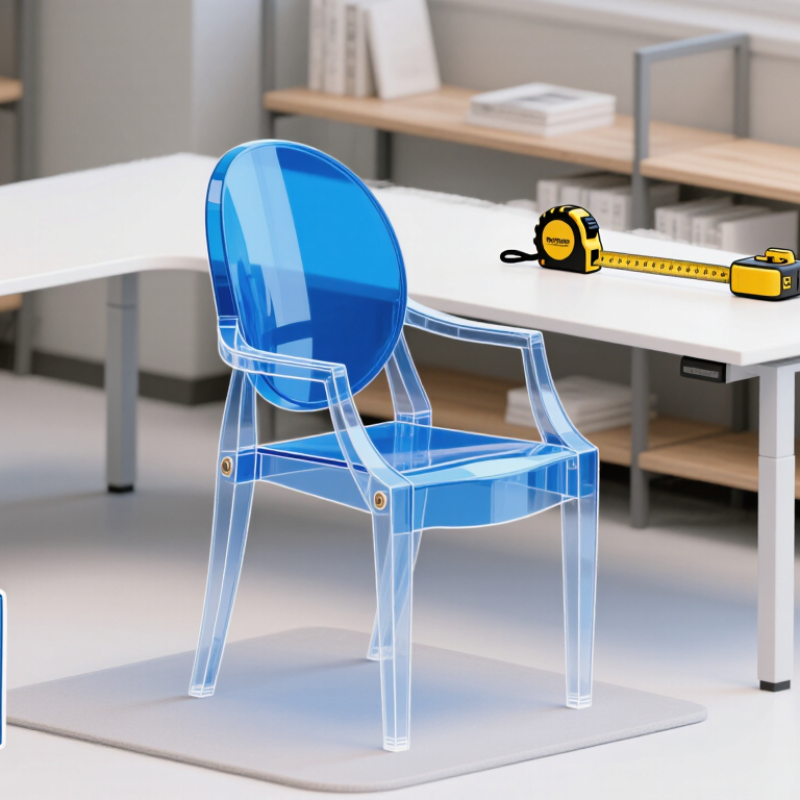
A blue acrylic desk chair is defined by its material, color, and visual structure. Acrylic is a rigid thermoplastic that can be molded into a curved seat or transparent back. Its blue tint may be clear, smoky, or nearly opaque. This changes how the chair looks under daylight. The surface often feels smooth and cool, while the frame provides most of the strength. Look for a stable five-point base, secure casters, and a height mechanism that moves without grinding. These details matter more than a dramatic silhouette. In a small office, transparent blue can make the floor feel less crowded. Yet acrylic may show fingerprints, fine scratches, and dust quickly. That is part of its character, not a flaw to ignore.
When choosing one, sit for at least ten minutes. Check whether the seat edge presses behind your knees. A molded back can look supportive without fitting every body. I have found that attractive chairs sometimes lack useful lumbar adjustment. That weakness deserves honest attention. Confirm the seat height, width, weight rating, and swivel range in the product specifications. A padded cushion may improve long sessions, but it can weaken the clean acrylic effect. Wipe the chair with mild soap and a soft cloth; harsh cleaners can cloud the surface. Place it away from direct heat and rough contact. A blue acrylic desk chair works best when its appearance and daily comfort agree. They do not always agree.

A blue acrylic desk chair can brighten a workspace, but appearance should not decide everything. Measure the available area before shopping. Leave enough room for the chair to move behind the desk. The seat should fit your hips without pressing against either side. For most users, a seat height that keeps both feet flat works best. Your knees should remain close to a right angle.
Comfort depends on more than soft padding. Acrylic can feel firm, especially during long work sessions. Check whether the seat has a gently curved surface and a smooth, rounded front edge. A two-finger gap behind your knees can prevent pressure. Sit for at least twenty minutes if possible. Notice heat, sliding, and pressure around your hips. I once chose a beautiful transparent chair that felt fine for five minutes. After an hour, its hard edge became distracting.
Ergonomics also includes support and movement. The backrest should support your lower and middle back without forcing your shoulders forward. Adjustable height is valuable when your desk is fixed. Armrests should let your elbows rest near your sides, but they must slide under the desk. Test the chair while typing, reaching, and turning. It should stay stable without feeling rigid. Clear acrylic may show scratches, dust, or fingerprints quickly, so inspect the finish under bright light. Some measurements still need adjustment. Your preferred posture may change during the day.
Practical ergonomic dimensions to check before buying
Use these common ergonomic screening ranges as a starting point: the seat should adjust to keep your feet flat, the seat should support your thighs without pressing behind the knees, and armrests should allow relaxed shoulders. Acrylic can provide a distinctive appearance, but comfort depends mainly on adjustable dimensions, cushioning, lumbar support, smooth edges, and long-term stability.
Measurements are shown in inches and represent practical fitting ranges rather than universal requirements. Always compare them with your own body dimensions and the chair’s manufacturer specifications.
When choosing a blue acrylic desk chair, inspect the acrylic before admiring its color. Clear, even blue indicates controlled pigment distribution. Look for cast acrylic, consistent thickness, polished edges, and no cloudy patches. ASTM D1003 measures haze and light transmission, so ask for test results rather than trusting showroom lighting. A 3–5 mm panel may look substantial, but it should not carry the chair alone.
The frame matters more for safety and daily comfort. Powder-coated steel usually offers strong load resistance, while aluminum reduces weight and resists corrosion. Check welded joints, fasteners, and the five-wheel base closely. Testing programs based on BIFMA X5.1 commonly include a 275-pound static load and 100,000-cycle durability testing. Request the actual laboratory report. A seller’s word is not evidence.
Surface coatings and adhesives deserve attention too. The U.S. Environmental Protection Agency reports that indoor pollutant levels can be two to five times higher than outdoor levels. Choose low-emission finishes when possible, especially in a small office. UV-stabilized acrylic can resist yellowing, but “UV-resistant” remains vague without aging data, such as ISO 4892-2 testing. I would not trust a glossy sample alone. Inspect a corner under daylight. Ask whether the frame was tested with the finished acrylic attached, not separately. That detail is easy to miss, and it may change the chair’s real performance.
A blue acrylic desk chair can shape the mood of an entire workspace. Match its blue tone with one existing detail, such as a rug, notebook, or wall print. Do not repeat the color everywhere. Too much blue may make the room feel cold. For a calm office, pair the chair with pale wood, white walls, and soft gray fabric. For a stronger creative look, use black metal, warm lighting, and orange or mustard accents.
Consider the chair’s transparency, too. Clear acrylic allows the floor and nearby colors to remain visible. This quality suits compact rooms because it creates less visual weight. In a traditional workspace, the chair may look more balanced beside a wooden desk with simple lines.
In a modern room, glass, steel, and smooth surfaces can reinforce its clean character. Check the light during the day. Reflections can look attractive, but they may also distract you.
Comfort should guide the final choice. Sit for ten minutes and test the back support, seat height, and arm movement. A beautiful chair that causes shoulder tension is a poor match. I would also compare the chair with your actual desk, not a showroom table. My own first instinct would favor a brighter blue, yet a muted shade often works longer. The room may need a little contrast, not perfect coordination.
How to Choose a Blue Acrylic Desk Chair?
Before buying a blue acrylic desk chair, inspect it in person if possible. Acrylic can look strong while hiding small scratches or stress marks. Run your fingers along the seat, backrest, and armrests. The surfaces should feel smooth, without sharp edges or cloudy patches. Check the chair’s weight rating and compare it with your daily needs. Do not guess. Sit down for ten minutes. Notice whether your feet rest flat and your lower back feels supported. A beautiful chair may still become uncomfortable during long work sessions.
Examine the base, casters, gas lift, and joining points carefully. The base should stay stable when you lean slightly sideways. Casters should roll without catching on the floor. Test the height adjustment several times. Ask whether replacement parts are available from the seller. This detail is easy to overlook. Measure your desk height, doorway, and available floor space before ordering. I once focused too much on color and underestimated the chair’s width. That mistake made movement awkward.
Maintenance requires gentle habits. Wipe acrylic with a soft microfiber cloth and diluted mild soap. Dry it immediately to prevent streaks. Avoid abrasive pads, rough paper towels, strong solvents, and high heat. Keep the chair away from direct sunlight when possible, because prolonged exposure may affect its finish. Tighten loose screws every few months. Inspect cracks, wobbling, and unusual sounds early. Do not use the chair if a structural part appears damaged. A clear maintenance record helps reveal repeated problems, although many people forget to keep one.
| Check Area | Recommended Specification or Range | What to Check Before Buying | Maintenance Guidance |
|---|---|---|---|
| Acrylic Material | Clear or blue-tinted acrylic with an even surface and no visible cracks. | Inspect edges, mounting points, seat corners, and the underside for chips, stress marks, or sharp areas. | Clean with a soft microfiber cloth and mild soap solution. Avoid ammonia, acetone, alcohol, abrasive powders, and rough sponges. |
| Blue Color and Finish | A consistent blue tone, with a gloss, satin, or frosted finish clearly stated by the seller. | Check the color under natural and indoor light. Confirm whether the color is molded into the acrylic or applied as a surface coating. | Keep the chair away from prolonged direct sunlight and strong heat sources to reduce fading, yellowing, or distortion. |
| Seat Width and Depth | Approximately 45–52 cm wide and 40–48 cm deep for a general-purpose desk chair. | When seated, allow a small gap between the back of the knees and the front edge of the seat while keeping the hips supported. | Remove dust and debris from the seat edges and joints so particles do not create scratches during use. |
| Seat Height | A common adjustable range is about 42–52 cm from the floor to the seat surface. | At the lowest setting, verify that feet can rest flat on the floor. At the normal setting, elbows should remain close to desk height. | Test the height lever periodically and replace the gas lift if the seat slowly sinks or fails to hold its position. |
| Weight Capacity | Choose a published capacity that exceeds the user’s weight; a 100–120 kg rating is common for many general-use chairs. | Check the manufacturer’s stated maximum load and whether it applies to normal sitting only or includes reclining and movement. | Do not stand on the chair, overload it, or use it as a step. Tighten structural fasteners if movement or wobbling develops. |
| Back Support | The backrest should support the lower and mid-back without forcing the shoulders forward. | Sit for at least several minutes and check whether the backrest feels stable, comfortable, and appropriate for the intended desk work. | Wipe the backrest regularly and inspect its connection points for looseness, cracks, or unusual flexing. |
| Armrests | Adjustable armrests are useful; the arm pads should support relaxed elbows without raising the shoulders. | Confirm that the armrests fit under or around the desk and do not prevent the chair from moving close to the work surface. | Clean with a soft cloth and check the adjustment buttons, screws, and attachment points for wear. |
| Base and Casters | A stable five-point base is generally preferred for an office chair; caster type should match the floor surface. | Check that the base sits level, casters roll smoothly, and the wheels do not scratch the intended floor. | Remove hair and dust from caster axles. Replace damaged or unevenly rolling casters rather than forcing them to turn. |
| Stability and Safety | The chair should remain stable during ordinary sitting, swiveling, height adjustment, and controlled reclining. | Look for safety instructions, load information, secure fasteners, smooth edges, and documented compliance with an applicable office-chair standard where relevant. | Stop using the chair if the base, acrylic shell, gas lift, or tilt mechanism shows cracks, deformation, or sudden movement. |
| Desk Compatibility | The chair should fit beneath the desk with adequate clearance for armrests and the user’s legs. | Measure desk height, knee clearance, chair width, and the available turning space before ordering. | Avoid dragging the chair against desk legs or walls, as repeated impact can scratch the acrylic and loosen joints. |
| Comfort and Sitting Duration | For extended work, prioritize supportive shaping, suitable cushioning, adjustable height, and a stable backrest over appearance alone. | Check pressure points after 15–30 minutes and confirm that the chair allows a neutral posture. | Change posture regularly, stand periodically, and avoid using a decorative acrylic chair for long work sessions if it lacks ergonomic support. |
| Cleaning Frequency | Light dusting weekly and spot cleaning whenever fingerprints, spills, or dirt appear. | Confirm that the care instructions permit the cleaning products you plan to use. | Use lukewarm water, mild soap, and a clean microfiber cloth. Dry the surface immediately to prevent streaks and water marks. |
| Warranty and Replacement Parts | Prefer clear coverage for structural components, gas lift, casters, and replacement hardware. | Check warranty duration, exclusions, return conditions, assembly requirements, and availability of compatible replacement parts. | Keep the purchase record and assembly instructions. Replace worn components promptly instead of modifying the acrylic structure. |
Practical note: Acrylic can be durable but is more vulnerable to scratching and chemical damage than many conventional chair materials. Always follow the care instructions supplied with the chair.